Calling the Ophiuroidea webservice from Taverna
Go to
https://www.taverna.org.uk/download/workbench/, download & install Taverna Workbench (Windows/Mac OS
X/Linux).
You need to use at least version 2.x.
Step 1: Import the WSDL file
Import new service > WSDL service > Location: 'https://marinespecies.org/ophiuroidea/aphia.php?p=soap&wsdl=1'
Step 2: Add services getAphiaID and getAphiaSynonymsByID, input port (ScientificName) & output port (Synonyms)
See below:
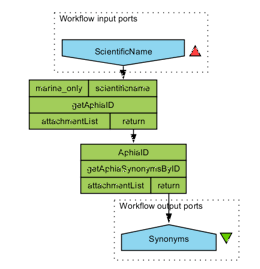
Step 3: Run the workflow
Download this example.