Calling the WoRMS webservice from Microsoft Excel 2010
This tutorial assumes you are using any Microsoft Windows Operating System with Office 2010 (32 or 64bit) installed
Step 1: Enable the developer tab in Excel
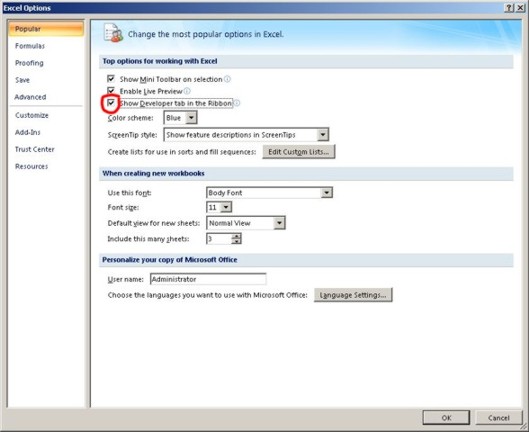
Start Excel, click on the Office button, choose "Popular" and check "Show Developer tab in the Ribbon".
Step 2: add a reference to Microsoft Office Soap Type Library 3.0
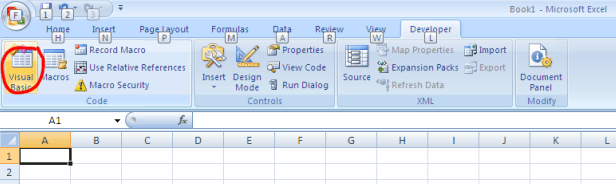
Open Visual Basic by going to the first option on the developer tab on the Ribbon.
In Visual Basic, go to Tools > References.
Scroll down the list of libraries and pick 'Microsoft Office Soap Type Library 3.0'
If not found, click 'Browse' and select 'MSSOAP30.DLL' located in 'C:\Program Files (x86)\Common Files\Microsoft Shared\Office 14' (or similar, depending on your installation)
Step 3: Create a Visual Basic module using the Visual basic Editor
Add this piece of code by choosing Insert->Module. Copy this code into your Excel VBA module
Option Explicit
'Excel VBA Function to call the AphiaNameService
Public Function getAphiaID(ScientificName As String) As Single
Dim objSClient As SoapClient30
Dim AphiaID As Single
Set objSClient = New SoapClient30
Call objSClient.MSSoapInit(par_WSDLFile:="https://marinespecies.org/aphia.php?p=soap&wsdl=1")
'Call the web service
AphiaID = objSClient.getAphiaID(ScientificName, True)
Set objSClient = Nothing
getAphiaID = AphiaID
End FunctionClose the VB Editor.
Step 4: Using the function in Excel
You can now use the function getAphiaID as you would any built-in Excel function.
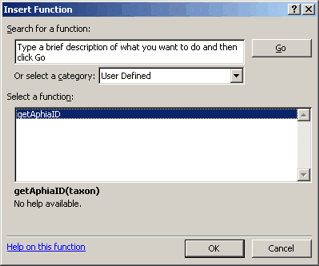
Select the cell you want the value displayed in, then go to the Insert menu and choose Function.
In the Paste Function dialog box, scroll down to User Defined functions and you should see getAphiaID listed:
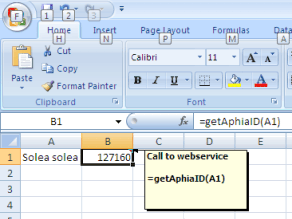
The result should be something like this:
Download this
example.
Download elaborate example for getAphiaRecordById.
Download elaborate example for matchAphiaRecordsByNames (custom SOAP call).
